 Sortypix
Download
Sortypix
Download
SORTYPIX AI · BETA
Sortypix, with
a second opinion.
Sortypix AI is Sortypix with an extra pair of eyes: a model that runs on your computer, looks at every photo in the folder and suggests which ones to set aside. You keep the last word.
Not sure? Most people want Sortypix. The light one: 5 MB, instant, for Windows and Linux, and you decide everything yourself. Sortypix AI is for very big folders.
Download SortypixBeta 0.3.0 · Windows 10 or 11 · x64 · about 400 MB, served from GitHub · no admin rights needed. Free and open source.
Who it’s for
Sortypix AI shines when a folder is too big to look at every photo closely, and many of them look alike.
- A batch of AI images for a LoRAHundreds of generations from the same prompt. Search by word finds the ones with the right subject, “Most varied first” spreads out the look-alikes, and the lowest scores show the weakest images first.
- A phone camera rollYears of photos in one folder. “Lowest score first” brings the weakest shots to the top, so the obvious rejects go in one gesture.
- Bursts from an eventA wedding, a match, a concert: dozens of near-identical shots per moment. Each burst is pointed out, so you compare them side by side and keep the best one.
- Not for a small folderA few hundred photos? Sortypix sorts them just as fast, without a 400 MB download.
Sortypix or Sortypix AI?
Two separate apps, on purpose. Sortypix stays small and instant for everyone who never asked for a model; Sortypix AI is for the folders where a second opinion is worth the extra weight.
- Pick SortypixIf you want the lightest, fastest sorter. It knows nothing about what’s in your photos, and that’s the point: nothing runs in the background, you decide everything. Sortypix is here.
- Pick Sortypix AIIf your folders are huge and you’d like a hint about where the weak ones are, the bursts and the photos that don’t belong.
| What changes | Sortypix | Sortypix AI BETA |
|---|---|---|
| Download | about 5 MB | about 400 MB |
| Installed | about 16 MB | about 0.6 GB, plus up to 1 GB of analysis cache (3 KB per photo) |
| Analysis | none | about 10 to 16 photos per second on a 16-core desktop, slower on smaller machines |
| Your processor | only shows your photos | busy while it analyses: fans may spin up, a laptop on battery drains faster |
| Who moves a photo | you | you: the model only suggests |
| Network | never | never |
| Systems | Windows and Linux | Windows for now, Linux to follow |
Both install side by side. Each has its own folder, Start menu entry and “Open with” entry on folders, and they share their settings. Installing or removing one never touches the other.
How it works, step by step
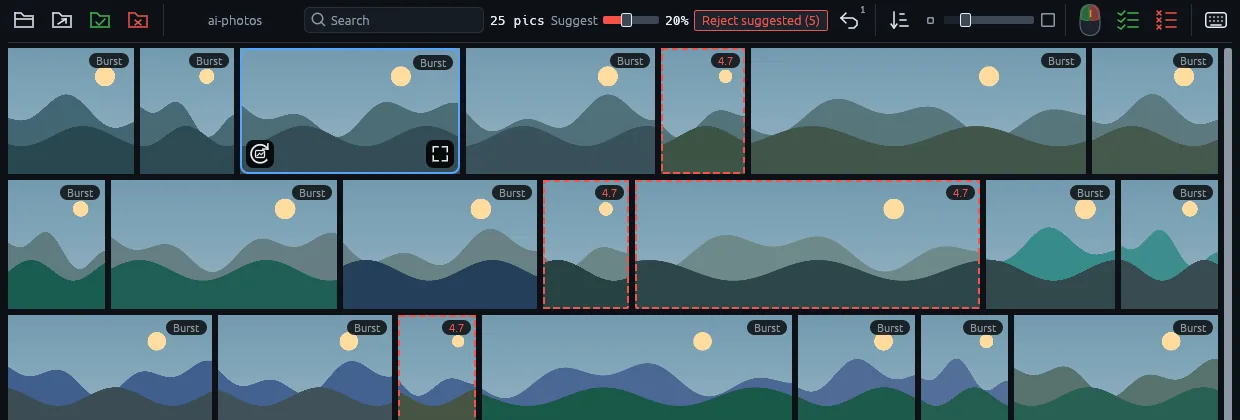
- Open a folder. Right-click it in Explorer and choose “Open with Sortypix AI”, or drop it on the window. The grid shows up right away, like in Sortypix.
- Watch the thin blue line. It runs under the toolbar while the model looks at each photo. You can already sort: left click keeps, right click sets aside.
- Read the marks. The photos it would set aside get a red dashed outline with their score. Photos that don’t fit with the rest of the folder get an amber “Off-topic” badge, near-identical shots a “Burst” badge.
- Choose how many. “Suggest 20%” sets the share of the folder it marks. Slide it up or down and the outlines follow.
- Click “Reject suggested”. Every marked photo moves to
rejected/in one gesture, next to your folder. Nothing is deleted. - Changed your mind? One Ctrl+Z brings them all back.
Everything else it can do
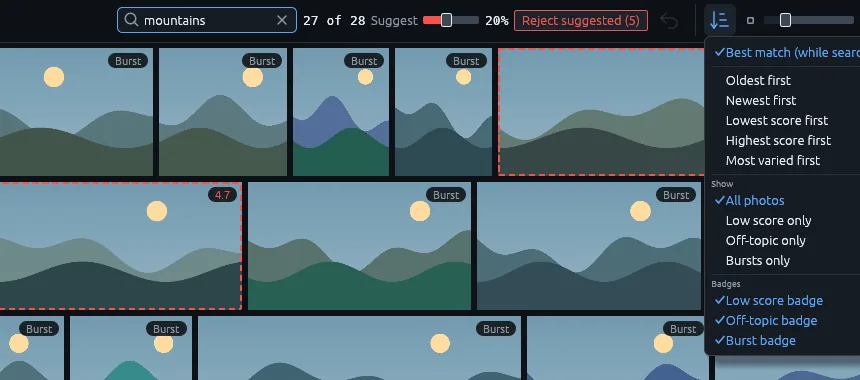
- Search by wordType “dog”, “sunset” or “mountains” and the grid keeps the photos that match, best match first.
- New ordersLowest score first, highest score first, or most varied first to see one of each kind before the look-alikes.
- FiltersShow only the low scores, the off-topic photos or the bursts, and hide a kind of badge you don’t want to see.
- Progress on the taskbarThe analysis also shows on the Windows taskbar button, so you can wait for it in another window.
What it does not do (yet)
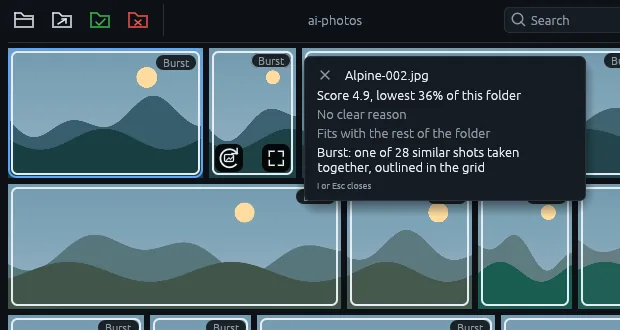
- It doesn’t pick the best shot of a burstBursts are only marked in this beta: the model isn’t reliable enough at that yet, so the choice stays yours.
- Its reasons are a hintThe photo card gives a likely reason for a low score, but only blur is told apart reliably for now.
- Windows only, for nowLinux will follow once it has been tested on a real machine. Sortypix itself runs on Linux today.
- It wants a strong processorAbout 10 to 16 photos per second on a 16-core desktop, slower on smaller machines. On a small laptop, a big folder takes hours.
How long the analysis takes
At 10 to 16 photos per second, 1,000 photos take one to two minutes, 30,000 photos 30 to 50 minutes and 300,000 photos five to eight hours. You can sort while it works.
Each photo is analysed once: moving it into keep/ or rejected/ doesn’t start over.
Good to know
Do my photos leave my computer?
No. The model ships inside the installer, the analysis runs on your computer and the app never goes online, not even to update itself.
Can the model move or delete my photos?
No. It never moves, renames or deletes a photo by itself. A suggested photo goes to rejected/ only when you say so, and Ctrl+Z brings it back.
Will my computer feel it?
Yes, while it analyses. The analysis runs below normal priority, so scrolling and sorting stay smooth, but fans may spin up and a laptop on battery drains faster. Expect about 1.5 GB of memory in use during the analysis.
Why is it so big?
Most of the 400 MB is the model itself, so that nothing has to be downloaded later. Sortypix, without the model, is about 5 MB.
Is it free?
Yes, free and open source, like Sortypix. The code is on GitHub.
Why can Windows warn about the installer?
The installer isn’t digitally signed yet: if Windows shows “Windows protected your PC”, click “More info”, then “Run anyway”.