 Sortypix
Download
Sortypix
Download
A PRACTICAL GUIDE
How to sort thousands
of photos, fast.
A phone camera roll, a holiday, a night of AI image generation: past a few hundred pictures, a photo viewer turns sorting into a chore, and pro photo software is more than the job needs. Here is a method that holds up on folders of thousands, with the small free tool built for it.
Windows 10 or 11 · Linux preview · Open source · No account
Why a photo viewer gets slow
A viewer shows one picture at a time. To sort, you look, close, go back to the file manager, enlarge the thumbnails with Ctrl + wheel, select, then drag each one to a folder. Every photo costs several gestures, and on thousands of photos those gestures are the whole afternoon.
Pro photo software solves a different problem: catalogues, imports, editing. It is powerful, but a lot to install and learn when all you want is to keep the good shots.
The method: one gesture per photo
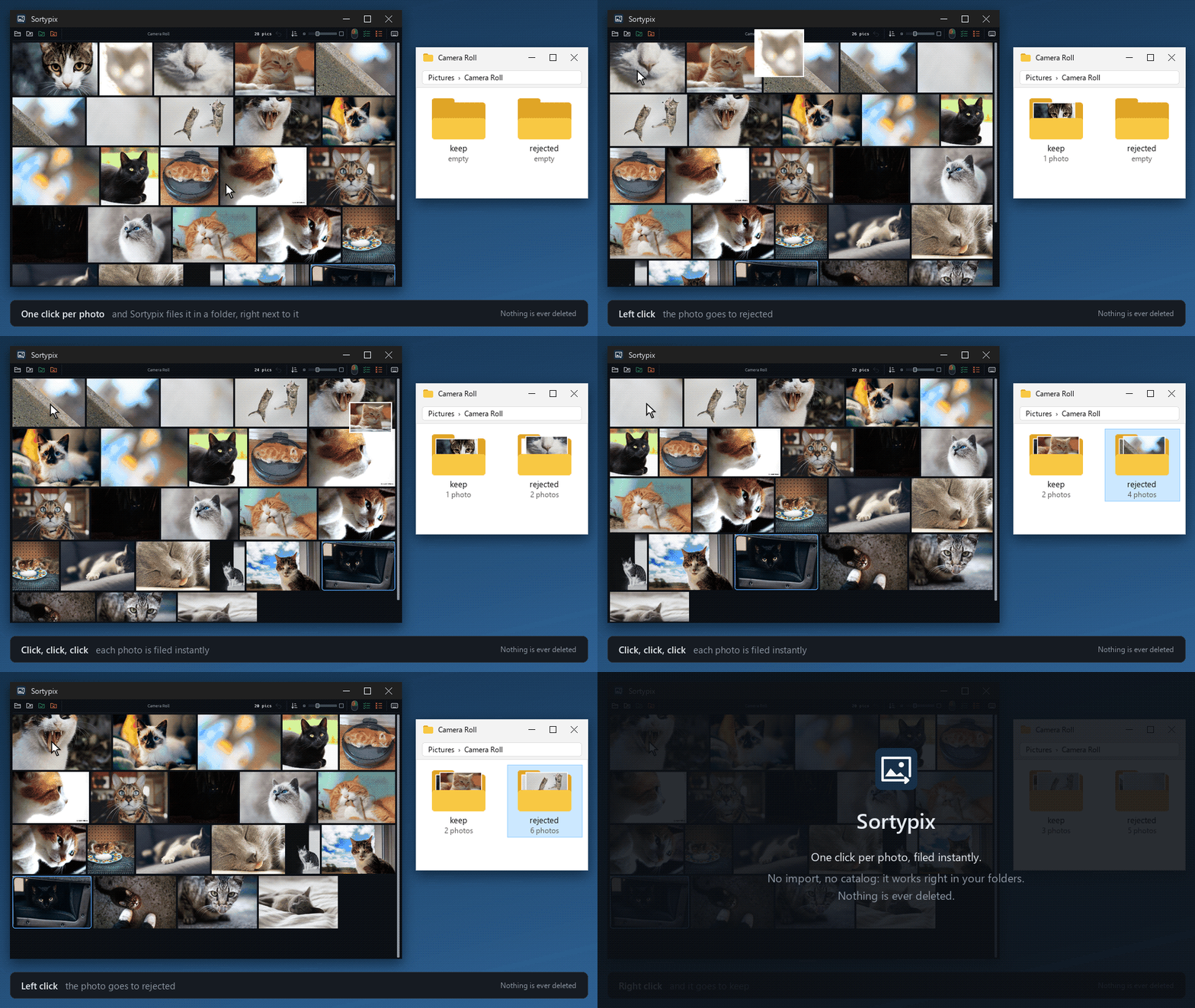
- Open one folder. Right-click it in Explorer and choose “Open with Sortypix”, or drop it on the window. Sortypix sorts that folder only, never its subfolders.
- Scroll the grid. Drag the size slider until you can judge a photo at a glance. Enter shows one photo full screen, Z shows it at 100%.
- Click. A right click keeps the photo and moves it to
keep/; a left click sets it aside inrejected/. It leaves the grid and the next one is already there. K and X do the same from the keyboard. - Clear a whole series at once. Ctrl+click (or middle-click) a photo: it goes to
rejected/with every photo before it, all the ones you’ve already scrolled past. The two checklist icons in the toolbar keep or set aside everything still in the folder, all the ones you haven’t seen. - Changed your mind? Ctrl+Z undoes the whole last gesture, a batch included, for as long as Sortypix stays open, even after you switch folders.
Phone photos: years in one folder
Copy the camera roll into one folder and open it as it is: there is nothing to import. Exact copies, the same photo backed up twice, are set aside as soon as the folder opens. RAW and JPEG pairs move together, so a camera’s two files never get separated. The grid can run oldest first or newest first.
AI images: hundreds that look alike
Generating in batches leaves you with hundreds of variations of the same prompt, nearly identical, of which you want three. This is where one gesture per image pays off:
- Make the thumbnails large so the small differences show. PNG and WebP open like photos.
- Right-click the few worth keeping. They move to
keep/and leave the grid. - Ctrl+click the last image you looked at. Every image before it moves to
rejected/in one go. Repeat for the next series.
Byte-for-byte copies are set aside automatically. Choosing between look-alikes stays your call: Sortypix never guesses which image is best. More on sorting AI images
Nothing is deleted
Sorting moves files into two subfolders next to your photos, keep/ and rejected/, which you can open from the toolbar. Sortypix never deletes a file, never sends one to the Recycle Bin and never overwrites one. When you are sure, empty rejected/ yourself. Everything happens on your computer: Sortypix never accesses the network.
Good to know
Is Sortypix free?
Yes, and open source under the MIT license. The code is on GitHub.
Does it edit or rename my photos?
No. It only moves them. Rotating a photo changes the view during the session, never the file.
Does it handle video?
No, and it never will: Sortypix is for photos only. Videos in the folder are left where they are.